Picture this: you've just secured a Victory Royale, the storm is closing in, and instead of the usual celebratory floss or orange justice, you drop the beat. Not just any beat, but a complex, multi-layered symphony you composed on the spot using Doja Cat's vocals, a thumping bassline from a Future track, and Chappell Roan's fiery drums. Welcome to Fortnite in 2026, where the most dangerous weapon isn't a Mythic Scar, but a perfectly mixed Jam Track. Who needs a squad when you can be an entire orchestra? The game's Jam Session feature has evolved from a neat party trick into a full-fledged music studio, allowing players to weave together hundreds of songs into personalized anthems right in the middle of a match.
The Symphony of Simplicity: How to Conduct Your Chaos 🎵
You might think conducting a quartet while keeping an eye out for snipers sounds complicated, but Epic Games has ensured the process is as smooth as hitting a trick shot. Forget complex music software; your instrument is your Emote Wheel. The magic begins the moment you load into any mode—Battle Royale, Creative, or even Lego Fortnite. Here’s your step-by-step guide to becoming the next in-game DJ sensation:
-
Access the Jam Loops: Open your trusty Emote Wheel and navigate to the 'Jam Loops' section. This is your vault of musical possibilities.
-
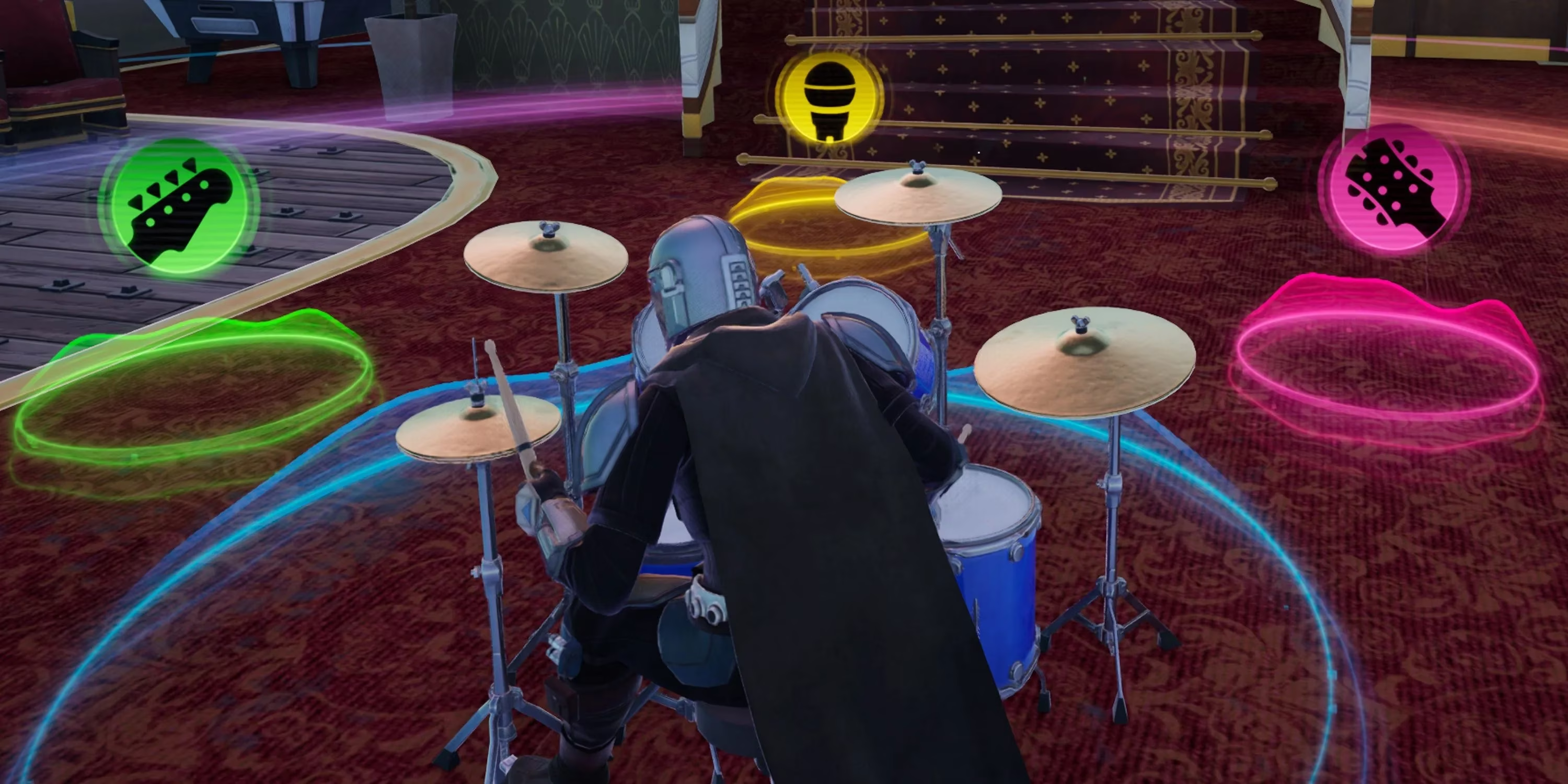
Start the Groove: Select any Jam Track and choose an instrument—vocals, guitar, drums, or bass. Activate it. Congratulations, you're now jamming! A vibrant colored circle will appear around your character.
-
Expand Your Band: Look around your circle. You'll see three smaller, glowing orbs hovering nearby. These aren't loot; they're your additional band members! Simply hover your cursor over each one.
-
Assign the Parts: For each orb, select a different Jam Track and a different instrument. Want Chappell Roan's "HOT TO GO!" on drums, Doja Cat's "Woman" on vocals, and the bass from "OG (Future Mix)"? You got it. That's the power of mixing and matching.
Think of it like this: you are the conductor, and those three orbs are your very obedient, musically gifted teammates. The result? A unique, layered track that is entirely your creation. Is there anything more stylish than emoting to a beat you built yourself?
The Art of the Musical Mashup: Creativity is Key 🎸
The real fun begins when you experiment. The system's genius lies in its limitless combinations. You're not just playing pre-set songs; you're deconstructing and rebuilding them. Consider these epic mashup possibilities:
| Mashup Idea | Vocal Track | Guitar/Bass Track | Drum Track | Vibe |
|---|---|---|---|---|
| Power Ballad Royale | Fortnite Original (Epic vocals) | A classic rock anthem | A hip-hop beat | Dramatic, victory-ready |
| Chill Lobby Mix | Lo-fi beats track | Smooth jazz bassline | Soft electronic drums | Perfect for pre-game lounging |
| Pump-Up Attack Mix | High-energy pop chorus | Heavy metal guitar riff | Intense drum & bass | For when you're pushing the final team |
The video reference perfectly illustrates this chaos: starting with the powerful drums of "HOT TO GO!," then breaking into the iconic vocals of "Woman," all underpinned by a steady bassline. It’s a musical Frankenstein's monster, and it's beautiful. Will your creation be a harmonious masterpiece or a beautiful, chaotic mess? Only one way to find out!
Beyond the Beat: Emoting in Perfect Sync 🕺
Here's a pro-tip many overlook: your jam circle is a zone of synchronized style. Any player who uses an emote within your musical aura will move in perfect time to the song's tempo. Their default dance suddenly becomes part of your performance! And speaking of tempo, you're not stuck with the original speed. Found the perfect mix but wish it was a hype-speed version for a box fight? Or a slow, dramatic version for a cinematic clip? Simply press Square (on PlayStation) or X (on Xbox)—the 'Change Tempo/Key' button—to shift the speed and pitch of your entire composition. This isn't just playing music; it's live remixing.
The Ultimate Flex: Why This Changes Everything 🏆
In a world where Victory Crowns and rare skins are the standard flex, a custom Jam Track is the ultimate personalized trophy. It says, "I didn't just win; I scored the soundtrack to my own win." The library, constantly updated, now features not just Fortnite originals and past hits, but fresh tracks from today's biggest artists, ensuring your mixes always sound current. In 2026, the lobby isn't just a place to wait; it's a concert venue. The battlefield isn't just about gunfire; it's punctuated by bass drops and guitar solos.
So, next time you drop into the island, remember: your greatest legacy might not be your win percentage, but that one absolutely fire mix of a Billie Eilish vocal, a Metallica guitar riff, and a Fortnite bassline that made the entire final circle start dancing before the fight even began. Now, isn't that a more interesting way to achieve world domination?